

CompuFire mounting location
Before we start ?
I have considered putting it on the side of the battery box where ?ignitor? is. That would take creating a bracket on that side and creating at least one extra mounting hole to put the ignitor in the OEM R/R spot.
I have considered putting it below the battery box but there seems to be limited vertical space to the swing arm (maybe because its is an ?L?)
The question -
To mount it in the current R/R location, I can either create a plate or I can grind a little aluminum from the CompuFire.
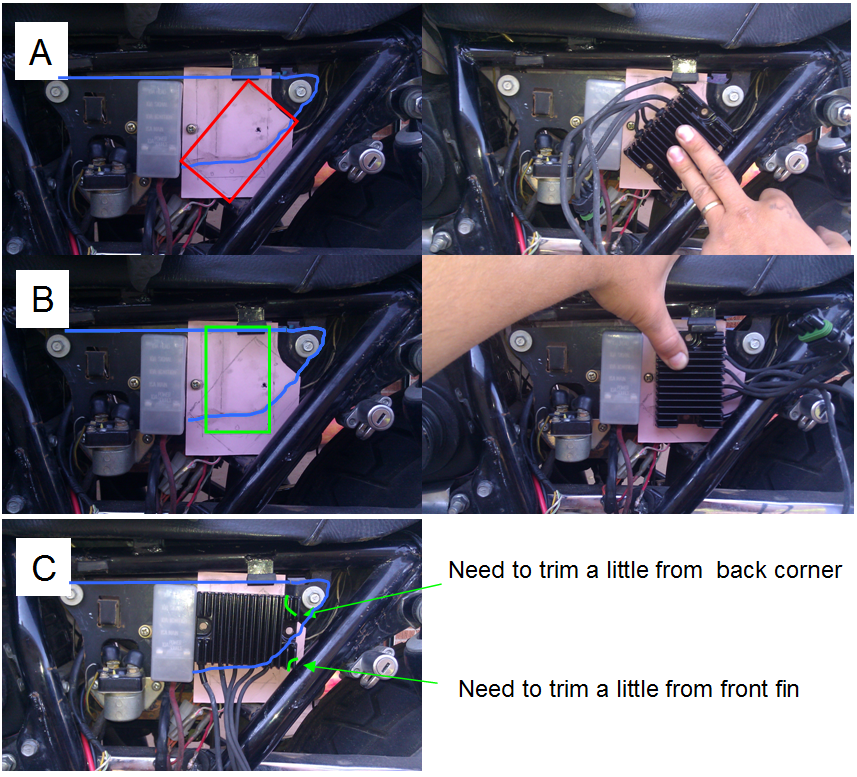
Maximum plate size is the paper cut-out seen but actual can be smaller. The BLUE line indicates the OEM mounting plate. Using the add-on plate, one hole will be in OEM mounting plate for the top hole and second (bottom) Compufire mounting hole is just in the new plate.
Please let me know your thoughts on the following ?
A ? Needs the plate - Wires are going up. Probably not an issue but just doesn?t seem quite right. One-point grounding would be on the bottom mounting screw.
B ? Needs the plate - Seems pretty symmetrical. One-point grounding would be on the bottom mounting screw.
C ? No plate needed. Can use one fuse box screw and need to make one hole for the other side. Nice and symmetrical and wires are pointing down. The trimming seems to affect only the aluminum of the CompuFire and not the internals. Others here have done similar trimming. One point grounding may be difficult on the left screw but possible on the right screw.
Thanks for your thoughts on these options or please make other recommendations you think I should consider.
Thanks,
Andrew
Before we start ?
I have considered putting it on the side of the battery box where ?ignitor? is. That would take creating a bracket on that side and creating at least one extra mounting hole to put the ignitor in the OEM R/R spot.
I have considered putting it below the battery box but there seems to be limited vertical space to the swing arm (maybe because its is an ?L?)
The question -
To mount it in the current R/R location, I can either create a plate or I can grind a little aluminum from the CompuFire.
Maximum plate size is the paper cut-out seen but actual can be smaller. The BLUE line indicates the OEM mounting plate. Using the add-on plate, one hole will be in OEM mounting plate for the top hole and second (bottom) Compufire mounting hole is just in the new plate.
Please let me know your thoughts on the following ?
A ? Needs the plate - Wires are going up. Probably not an issue but just doesn?t seem quite right. One-point grounding would be on the bottom mounting screw.
B ? Needs the plate - Seems pretty symmetrical. One-point grounding would be on the bottom mounting screw.
C ? No plate needed. Can use one fuse box screw and need to make one hole for the other side. Nice and symmetrical and wires are pointing down. The trimming seems to affect only the aluminum of the CompuFire and not the internals. Others here have done similar trimming. One point grounding may be difficult on the left screw but possible on the right screw.
Thanks for your thoughts on these options or please make other recommendations you think I should consider.
Thanks,
Andrew
Last edited:

