• Required reading for all forum users!!!

    Welcome!
    Register to access the full functionality of the GSResources forum. Until you register and activate your account you will not have full forum access, nor will you be able to post or reply to messages.

    A note to new registrants...
    All new forum registrations must be activated via email before you have full access to the forum.

    A Special Note about Email accounts!
    DO NOT SIGN UP USING hotmail, outlook, gmx, sbcglobal, att, bellsouth or email.com. They delete our forum signup emails.

    A note to old forum members...
    I receive numerous requests from people who can no longer log in because their accounts were deleted. As mentioned in the forum FAQ, user accounts are deleted if you haven't logged in for the past 6 months. If you can't log in, then create a new forum account. If you don't get an error message, then check your email account for an activation message. If you get a message stating that the email address is already in use, then your account still exists so follow the instructions in the forum FAQ for resetting your password.

    Have you forgotten your password or have a new email address? Then read the forum FAQ for details on how to reset it.

    Any email requests for "can't log in anymore" problems or "lost my password" problems will be deleted. Read the forum FAQ and follow the instructions there - that's what we have one for...

  • Returning Visitors

    If you are a returning visitor who never received your confirmation email, then odds are your email provider is blockinig emails from our server. The only thing that can be done to get around this is you will have to try creating another forum account using an email address from another domain.

    If you are a returning visitor to the forum and can't log in using your old forum name and password but used to be able to then chances are your account is deleted. Purges of the databases are done regularly. You will have to create a new forum account and you should be all set.

Signal harness question

  • Thread starter Thread starter Guest
  • Start date Start date
G

Guest

Guest
I've found a new signal harness and it works perfect...almost. I need to swap one of the male ends (from one side of the connector to the other). Anyone know how to get those male ends out of the connector without bashing the heck out of it or ripping the wire out?
 
Hi Mr. azr,

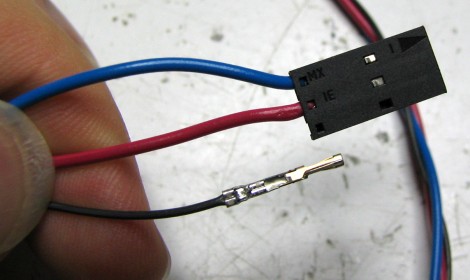
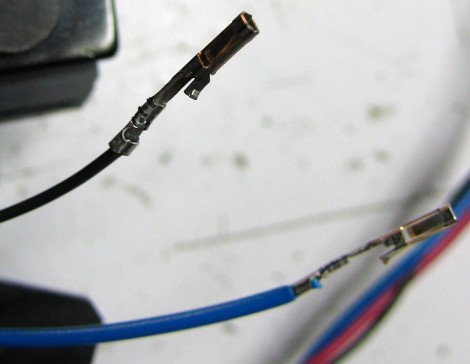
The connectors inside the Molex housing have a little springy clip which holds them in place. You need something to push the springy part back so as to unlatch the connector and let it slide out of the housing. The pictures following aren't exactly your setup, but hopefully will give you an idea.

sbs_photoresistor_crimped2.JPG


sbs_photoresistor_molex.JPG


Here is a clever trick for removing your standard male pins from your standard molex connector.

2.jpg


3.jpg


Use the back end of the ink reservoir to push out the male pin. This tip is from a computer-related website. Click here to view the post in that forum. There is also a specific tool used for this purpose. I'm sure you can find it at your local electronics store.

Thank you for your indulgence,

BassCliff
 
more wiring harness troubles

more wiring harness troubles

Thanks for the removal how to. Everything on the harness is working with the exception of the turn signals. The old broken on has an automatic canceling signal, the new one does not. I didn't think that would make a difference but alas no signals. I looked at the old harness and wired the new harness to match but now nothing works...go figure. Any body have any suggestion to what I am doing wrong or is it a matter of the harnesses will not swap due to the one not being auto canceling.
 
Back
Top