• Required reading for all forum users!!!

    Welcome!
    Register to access the full functionality of the GSResources forum. Until you register and activate your account you will not have full forum access, nor will you be able to post or reply to messages.

    A note to new registrants...
    All new forum registrations must be activated via email before you have full access to the forum.

    A Special Note about Email accounts!
    DO NOT SIGN UP USING hotmail, outlook, gmx, sbcglobal, att, bellsouth or email.com. They delete our forum signup emails.

    A note to old forum members...
    I receive numerous requests from people who can no longer log in because their accounts were deleted. As mentioned in the forum FAQ, user accounts are deleted if you haven't logged in for the past 6 months. If you can't log in, then create a new forum account. If you don't get an error message, then check your email account for an activation message. If you get a message stating that the email address is already in use, then your account still exists so follow the instructions in the forum FAQ for resetting your password.

    Have you forgotten your password or have a new email address? Then read the forum FAQ for details on how to reset it.

    Any email requests for "can't log in anymore" problems or "lost my password" problems will be deleted. Read the forum FAQ and follow the instructions there - that's what we have one for...

  • Returning Visitors

    If you are a returning visitor who never received your confirmation email, then odds are your email provider is blockinig emails from our server. The only thing that can be done to get around this is you will have to try creating another forum account using an email address from another domain.

    If you are a returning visitor to the forum and can't log in using your old forum name and password but used to be able to then chances are your account is deleted. Purges of the databases are done regularly. You will have to create a new forum account and you should be all set.

replacing PLUG IN BOX r/r? on gs 300

  • Thread starter Thread starter KitKat
  • Start date Start date
K

KitKat

Guest
so i got my honda r/r today. and i have read through basecliff's tutorial. However; some of the stuff doesn't apply to me because my bike has a side mounted plug in r/r. which means that theres a box with plugs in to the r/r once it is mounted.

I can easily adapt spade connecters onto the honda r/r and plug it into the box but im not sure where all the wires go.

Bikecliff's tutorial talks about wiring them directly to the stator, but i don't have to do that because my wires come directly from the stator to my plug in box. i know red is power, with an inline fuse, and green is ground. other than that, i need help understanding where i put the other wires.

Heres a pic of my stock r/r, the black underneath is the plug in box i am talking about and it comes off easy (pressing to flanges).
2jebaer.jpg


heres an attempt at a closer pic of the wires coming out of the plug in box

2znzx8x.jpg


and heres the honda r/r i just recieved from duanage ( Thanks!)

t8n5va.jpg


10p3ae1.jpg


so other than the green and red, where do the three yellow wires go on to my plug in box, and the black wire in the bunch with the green and red, is that the sense wire, and how do i wire it up. I have read on here that you wire it to your ignition, but i havn't found out where on the ignition box, and if its direct or not.

Thank you so much for any comments or help!

Thanks
 
bump.... please help. i know there are not a whole lot of 300s out there but there are a log of genius' on this site.
 
The Shack has tools and parts to remove the pins, crimp on new stuff, and insert the pins back into the plastic connector thingys.


.
 
i know how to connect the wires, just where to connect them is the dilema because basecliffs papers talk about removing the wires until they directly lead from the stator, but mine are in a plug in box, so does it matter what yellow wire goes to my other three colored/striped ones besides ground and power?

Thanks
 
... so does it matter what yellow wire goes to my other three colored/striped ones besides ground and power?
No.

As long as you have your red wire to the battery +, the ground wire (is that the black or green one?) to the battery -, and the other wire (the 'sense' wire) connected to a switched power wire (the tail light wire usually works well), the other three wires just get connected. The electrons are color blind and it's dark inside the wire, anyway, so they can't see what color wire they are running through. :D
 
awsome thank you so much.

about the sense wire.

do i take one of the tailight wires and just splice it into that or is there something special that has to be there for it to work?
 
Last edited:
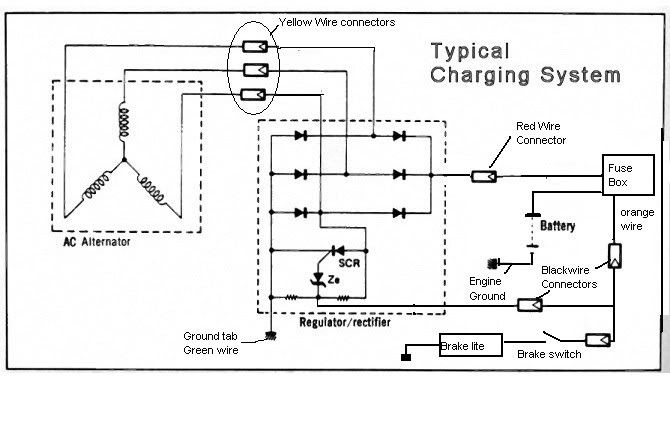
See the attached diagram.

Tap into the orange brake light switch power wire with one of the connectors of the black wire and power the brake light switch with the other. This orange lead is turned on with the key.

Use the new connectors I sent you to replace the plastic connector with. The male bullet goes on the red and the three female bullets go on the stator wires, which are white with different color stripes.

If you follow the stator wires they usually lead to yet another connector and from there to bullet terminals that connect to the stator. This second connector is a source of bad connections too.


So the best thing to do is find the three stator wires that originate at the engine and follow them to see if they end in female bullet terminals. Almost all do, it's a GS thing. And once you find the female bullets, connect the yellows to them in any order. I would replace the female bullets with the new connectors included so they are in good condition. these extra white plastic connectors and handlebar switches for lights off cause problems with the stator feeding the RR, contributing to the undeserved reputation the GS has for eating batteries.

HondaRRconnections-1.jpg
 
awsome thank you so much!

i will try that hopefully today or tomorrow and get back with my results.

Thanks!
 
Back
Top