• Required reading for all forum users!!!

    Welcome!
    Register to access the full functionality of the GSResources forum. Until you register and activate your account you will not have full forum access, nor will you be able to post or reply to messages.

    A note to new registrants...
    All new forum registrations must be activated via email before you have full access to the forum.

    A Special Note about Email accounts!
    DO NOT SIGN UP USING hotmail, outlook, gmx, sbcglobal, att, bellsouth or email.com. They delete our forum signup emails.

    A note to old forum members...
    I receive numerous requests from people who can no longer log in because their accounts were deleted. As mentioned in the forum FAQ, user accounts are deleted if you haven't logged in for the past 6 months. If you can't log in, then create a new forum account. If you don't get an error message, then check your email account for an activation message. If you get a message stating that the email address is already in use, then your account still exists so follow the instructions in the forum FAQ for resetting your password.

    Have you forgotten your password or have a new email address? Then read the forum FAQ for details on how to reset it.

    Any email requests for "can't log in anymore" problems or "lost my password" problems will be deleted. Read the forum FAQ and follow the instructions there - that's what we have one for...

  • Returning Visitors

    If you are a returning visitor who never received your confirmation email, then odds are your email provider is blockinig emails from our server. The only thing that can be done to get around this is you will have to try creating another forum account using an email address from another domain.

    If you are a returning visitor to the forum and can't log in using your old forum name and password but used to be able to then chances are your account is deleted. Purges of the databases are done regularly. You will have to create a new forum account and you should be all set.

Yikes..Wiring??

  • Thread starter Thread starter jwhelan65
  • Start date Start date
J

jwhelan65

Guest
82 GS 1100E....Anyone have a better wiring diagram other than what is in the repair manual?
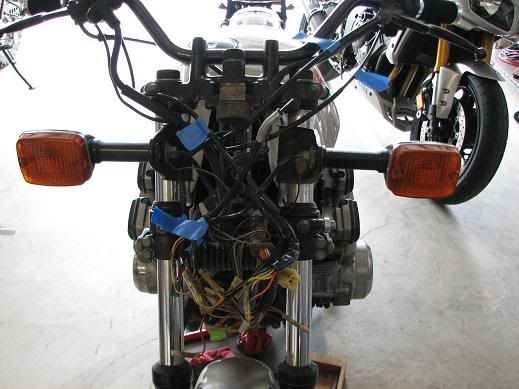
WiringHarness.jpg
 
Maybe a different manual? :-k

You have specific issues or you just looking for a better picture?
Many of us can help with generic problems if you just tell us what's bothering you.

.
 
wiring

wiring

Nothing specific, just swaping out the front end and thought there might be a modified version, the one in the manual is hard to follow.
 
a good tip is to photocopy it and get it enlarged, twice the size. makes it a whole lot easier to read and follow
 
Photo-copying it larger is a great tip. That's what I did last week. and.. the diagram on basscliff's site is the one for the E. Of course it may be the same one you are using currently. It just says 82 gs1100.
 
I should have a pdf file of the wiring diagram for the GS1100EZ at home. I check tonight, and email a copy to you if I find it.
 
Enlarge it as much as you can, make several copies, then trace the circuits you need with highlighters.

Making it bigger and making it something you can scribble and highlight on helps a lot.
 
If you have access to a laser printer (I use the one at work), you can print it out on A3 paper and as Brian said hilite each circuit (ground side and the active side to complete the circuit) and all will be well. Be careful though with Clymer manual diagrams as they have been known to make mistakes in some of their diagrams. Make sure the "HOT" wires are going to the right places and not to ground.
 
The one on Basscliffs site looks like it was taken from the same manual. Sometimes scanning to a pdf file will give a little better resolution than a jpg file, depending on the scanners used.
 
Be careful though with Clymer manual diagrams as they have been known to make mistakes in some of their diagrams.

The one on Basscliffs site looks like it was taken from the same manual.


Good news. :dancing:

I just examined that diagram a bit closer and found at least two things in your favor:
1. The errors I have seen in other diagrams do not exist in this diagram.
2. Although the year is not stated, the presence of the side stand warning switch indicates it's '82 or newer.

.
 
Don't be scared of this. Most are plugs that match each other. The only bullets are mostly turn signals, front brake light, clutch interlock switch, and these match colors.
 
Don't be scared of this. Most are plugs that match each other. The only bullets are mostly turn signals, front brake light, clutch interlock switch, and these match colors.
Indeed, im a vehicle electrical wiring diagram bafoon, and even I can track down problems from time to time. And when i cant, i call Steve..bawhahhaha.

I have the SHOP manual, but in all honesty it doesnt look any better. YOURS might even be in colour, this one is not.
 
I found the file of the diagram, if you want it. It's from the Suzuki shop manual, just like the one on Basscliff's site. If you want it, pm me with your email address. I can't attach files to the pm's.
 
I think it's also important to take the wiring diagram as more of a suggestion or a platonic ideal rather than an actual representation of reality.

In other words, don't do anything irreversible until you test the circuit you're working on and verify that it does exactly what you think it does.

As with anything involving vehicles a quarter century old, the reality of the vehicle in front of you may vary in subtle and important ways from the representation in the manual or parts diagram.
 
Re-usable

Re-usable

I got mine enlarged to 11 X 17 and plastified at Office depot.
I use erasable pens of different colour depending on what i'm working on.
And yes, these are old bikes, don't assume previous owner didn't do something weird to the wires...
 
Back
Top