• Required reading for all forum users!!!

    Welcome!
    Register to access the full functionality of the GSResources forum. Until you register and activate your account you will not have full forum access, nor will you be able to post or reply to messages.

    A note to new registrants...
    All new forum registrations must be activated via email before you have full access to the forum.

    A Special Note about Email accounts!
    DO NOT SIGN UP USING hotmail, outlook, gmx, sbcglobal, att, bellsouth or email.com. They delete our forum signup emails.

    A note to old forum members...
    I receive numerous requests from people who can no longer log in because their accounts were deleted. As mentioned in the forum FAQ, user accounts are deleted if you haven't logged in for the past 6 months. If you can't log in, then create a new forum account. If you don't get an error message, then check your email account for an activation message. If you get a message stating that the email address is already in use, then your account still exists so follow the instructions in the forum FAQ for resetting your password.

    Have you forgotten your password or have a new email address? Then read the forum FAQ for details on how to reset it.

    Any email requests for "can't log in anymore" problems or "lost my password" problems will be deleted. Read the forum FAQ and follow the instructions there - that's what we have one for...

  • Returning Visitors

    If you are a returning visitor who never received your confirmation email, then odds are your email provider is blockinig emails from our server. The only thing that can be done to get around this is you will have to try creating another forum account using an email address from another domain.

    If you are a returning visitor to the forum and can't log in using your old forum name and password but used to be able to then chances are your account is deleted. Purges of the databases are done regularly. You will have to create a new forum account and you should be all set.

OK, now for the run-down

  • Thread starter Thread starter KRISTI'SGS550
  • Start date Start date
OK, Cory, now that you have the picture thing figured out \\:D/, why not take a few moments and update your profile? :-s

It is often quite helpful to have your general location (you will note that mine is not very specific...southwest oHIo covers a LOT of geography) so others can see if they might have a riding buddy or a helping hand.

Then go in and create a sig line. Does not have to be fancy, could be as simple as
"Her bike is an '81 GS550
My bike is a ...."
This would prevent trying to remember to type it in every time you ask for help.

Oh, and you will soon learn that the board only allows four pictures per post. You might not have noticed that because you only did three, but also be aware that smilies count as pictures, too.

Not sure how your fileden handles links, but you can also post links to pictures without having them show up in the post.
That is one way I can show off my wife's bike without adding to the picture count. 8-[


.
 
Steve,
thanks a bunch for the helpful hints. I will get my profile updated and add the bike to the sig line. I can see how this is helpful to others. I don't remember where it was but I read a post about how many pictures were allowed. I only had 3 to post this time. Fileden does allow links. If I post the picture as a link it will just show the picture in a new window from fileden. I think that is what you are asking about.

psyguy,
just buy your wife a bike. You know how guys buy their wives guns and tools for their birthdays so the guys can use them. Some thing with a bike. Buy your wife a bike and you can work on it too.
 
Just testing the new avatar and signature. What do you guys think?
 
It's 11:40 PM. I work until 3:00 AM so I am used to being up late, or early however you look at it.
 
yup, just checked the world clock, it's washington state, not washington city, right? so, it's not that late after all
 
yeah Washington state is correct, what time is it in New Zealand?
 
Wow, almost a complete day difference that is amazing to think of.
 
Oh, and you will soon learn that the board only allows four pictures per post. You might not have noticed that because you only did three, but also be aware that smilies count as pictures, too.

That's funny. Last night it told me I could only upload one of "this" type, which was a .jpg. What is the preferred format?
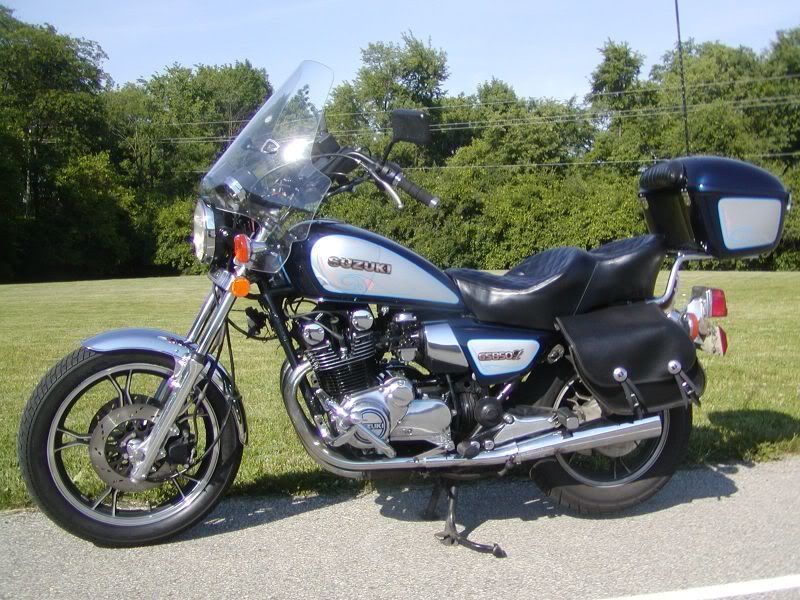
 
Cory,
Nice updates to the profile, sig line and avatar.


That's funny. Last night it told me I could only upload one of "this" type, which was a .jpg. What is the preferred format?
Preferred format is jpg for most stuff, as it is usually the smallest file size. However, the limit is only one if you try to attach the photo instead of inserting it. If you click on the little mountain picture in the menu line when you are typing a message, that attaches a picture. Limit one. And, it shows as a thumbnail picture in the post. When you click on the thumbnail, it brings up the full-size picture.

Instead, use your Photobucket (or whatever) picture listing. Depending on the settings you have in your account options, you might see up to four lines under each photo. I have found only two of them useful for posting pictures on this forum.
These are the options that are possible:
Display Share URL Display Direct Link Display Tag Display IMG
I only have the Direct Link and the IMG options listed for my albums.

To show up to 4 pictures in your post, open Photobucket in a separate window from the GS forum. Find the picture you want to show, click on the line that has IMG. You will get a message that says "Copied". Now go back to the message you are typing, make sure you are starting on a new line, and paste the link (Ctrl + V). You will only see the link until you preview your message, then the picture will appear. To make the picture sit better in the post, be sure it is on its own line, with no typing in front of or behind it.

If you want to merely insert the link to the picture, use the Direct Link line, instead. To use that in a message is a little harder, but still no problem. The format is to use a left square bracket [ , then type url= then paste the link and then the closing bracket ]. Next, type the description you want for your picture, then do the brackets again, with /url between them.
I am going to have to insert blanks so it does not work, so you would need something like this:
[ url=http://www.thegsresources.com/_scripts/gallerydispwnd.php?RegID=759 ] My wife's bike. [ /url ]

If you remove the spaces just inside the brackets [ ], here is what you get: My wife's bike. (By the way, this works for any web address, not just pictures.)

By using the IMG feature, you will paste this: [ IMG ]http://i25.photobucket.com/albums/c96/Tiggrbike/GS%20stuff/small850Left.jpg[ /IMG ] ( had to insert spaces so it would not work)

and you will get this:
small850Left.jpg
 
Thanks for the explanation, and sorry about hijacking the thread. I'll have to set aside some time to sort this out next time I'm ready to post some pics.
 
Steve,
I keep forgetting to tell you that is a beautiful bike. So before I forget, steve that is a beautiful bike!

Oh Dogma,
no worries on hijacking. I have done my share in the past. I think where ever, whenever you can get the information get it. Hope that part of the thread helped you out.
 
Todays update:

I got all the carbs pulled apart and seperated into their own little containers. I dipped the first carb over night and pulled it out today. WOW! What a difference. Before the Chem Dip the springs were nasty dirty and they are clean and spotless. Along with everything else on the carb body. When I took the carb body out I put the first bowl in it's place in the chem dip and will eave that over night as well.

I also got to use a new tool today. I had two pilot fuel screws or jets very stuck so I went to Sears and bought one of those nifty screw extractors. I got home and used a walk through I found on the web here, http://homerepair.about.com/od/interiorhomerepair/ss/screw_extractor.htm , and got the two stuck jets out. $12.00 more to add to the BikeBandit shopping list. But now all four carbs are completely tore down and awaiting their Saturday night dip in the Barrymann's.

In the meantime I got my new brake line for my bike, I haven't introduce you all to my bike yet. It is a 1982 Honda CB650. I have pretty much been building it up from a rolling frame. Last year at the end of the riding season I got it started up and was really excited about this. Anyway, I got my new brake line and installed it while I was in the garage.

A couple questions that came out of my working today.

The first one has to do with the GS. I pulled the plugs and they are black and sooty. I mean I have never seen plugs like this before. Any suggestions?

My second question has to do with my CB. As you know I put my new brake line on today, but all I can get going through the system is air. I thought maybe I just had to keep pumping the handle, but I squeezed for five minutes and all that came out of the bleeder tube is air.

The question is this, do I need to rebuild my master cylinder? Or is there another problem?

Any help or suggestions would be much appreciated.

Thanks all,

Cory
 
Back
Top